

Vehicle import
If you have a large fleet and would like to create profiles for all your vehicles, it's more convenient to import all the information with one signle file, rather than creating vehicle profiles one by one. In this case data has to be presented in XLS, XLSX or CSV file formats.
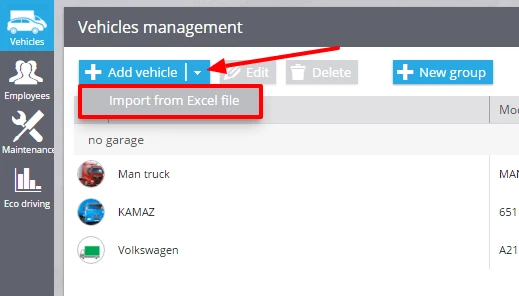
To import vehicle profiles from a file, please run the app "Fleet", proceed to the "Vehicles" section, click the button "Add vehicle" and choose the option "Import from Excel file".
After that you will see the import window, where you can see the Excel file example.
To relate the columns with right data in the tracking system you need to enter header fields. You can do it before the import or during the process.
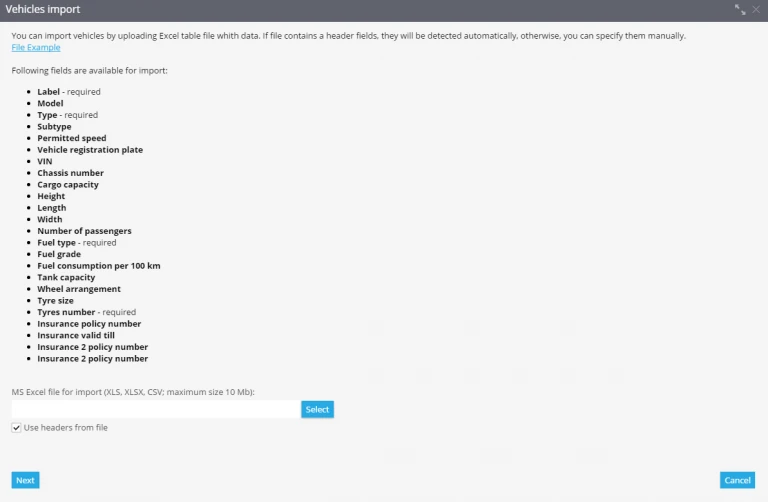
In the loaded file you need to specify in the following information:
- Label
- Model
- Type
- Fuel type etc.
Uploading file into the system
Click the button "Select", find the file, then click "Next". You will see the window where you should check header fields and press "Next".
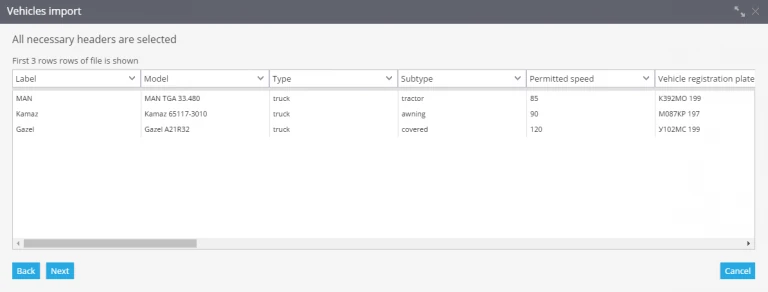
If some of the fields are wrong, the system will ask you to correct them. In case the fields are empty, information won't be imported.
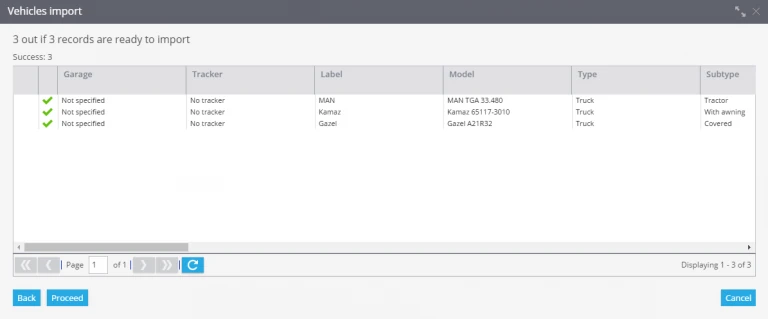
If all the information is correct, import will be completed successfully, and you will see it in the "Fleet".