

How can I get info from the form
With the forms browser you can easily get the full information on the completed forms.
To open the forms browser:
1. Click on the "Tasks" application;
2. Open the "Forms" module;
3. Point to the needed form template;
4. Click on the Submissions button that is on the right side menu.
In order to control the form completion and submission process in real-time, just create a rule "Task performance" and turn on notifications to be aware of the dispatching. You'll get a notification in the web-interface indicating the task completion.
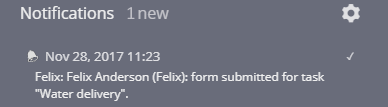
Put the email address in the "Notifications" section and than you'll receive a message about the form completion.
In the message you'll also find a link to the completed form which can be saved as PDF.