

Parking detection
The monitoring system automatically defines the facts of parking (states without movement), for the following purposes:
- To mark a movement trajectory to separate trips - for clear illustration and easy viewing in tabular reports;
- To capture "Trip end" / "Trip start" events - with possibility of Email/SMS notification.
Control of parameters of definition is carried out through the "Parking detection" portlet in the Devices application.
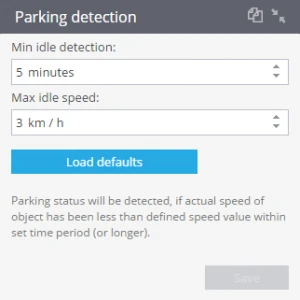
Parking detection by time and by speed.
Parking status will be detected, if actual speed of an object has been less than defined speed value within set time period (or longer). Speed is determined by GPS/GLONASS data.
This state is determined by the following parameters:
1. Minimum idle detection time (in minutes)
2. Maximum idle speed (km/h)
By default, these parameters have the following values: (1) 5 minutes, (2) 3 km/h.
Parking detection by ignition state
To consider ignition state for parking please wire ignition sensor of the device to the vehicle and create it in the "Sensors and Buttons" portlet. Parking state will be detected in the following cases:
1. In case actual speed of an object has been less than defined speed value within set time period (or longer);
2. If the actual speed of an object is less than defined speed value and the ignition of a tracker was OFF.
If your device for some reason does not detect ignition correctly, do not turn this option on. In this case all trips won't be recorded, until this option will be turned off.
Parking detection by motion sensor.
If you want to use motion sensor, parking state will be detected in the following cases:
1. In case actual speed of an object has been less than defined speed value within set time period (or longer);
2. In case tracker detects that it does not move ( with the help of a built-in motion sensor) within set time period (or longer)
3. In case actual speed of an object has been less than defined speed value and the ignition was OFF (if you put a tick "Consider ignition state");
4. In case a tracker detects that it does not move (with the help of a built-in motion sensor) and the ignition was OFF (if you put a tick "Consider ignition state").